Usage of the Self-Booking Stations
©
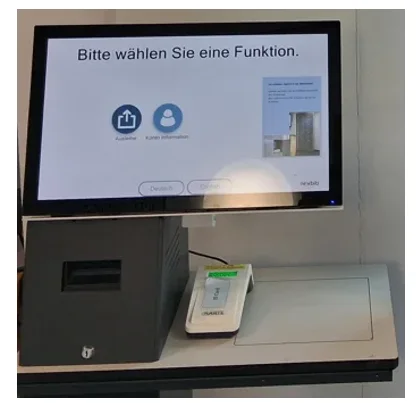
Using the Self-Booking Stations
- First, log in to a self-booking station.
- To do so, place your university ID card or library card on the card reader and then enter your PIN. You received your PIN via email from the library.
- You can use the self-booking station in German or English.
One of the two self-booking stations is height-adjustable and wheelchair-accessible.
Lending Media
- Select the “Checkout” button.
- Place the media on the scanning pad. They will then be added to your lending account.
- After checking out the items, you will automatically receive a loan receipt via email. You can also print out a loan receipt.
Extending the loan period
- Select the “Account Information” button.
- There you will see all the items you currently have checked out. You can extend the loan period if needed.
My User Account
Hochschulbibliothek
©
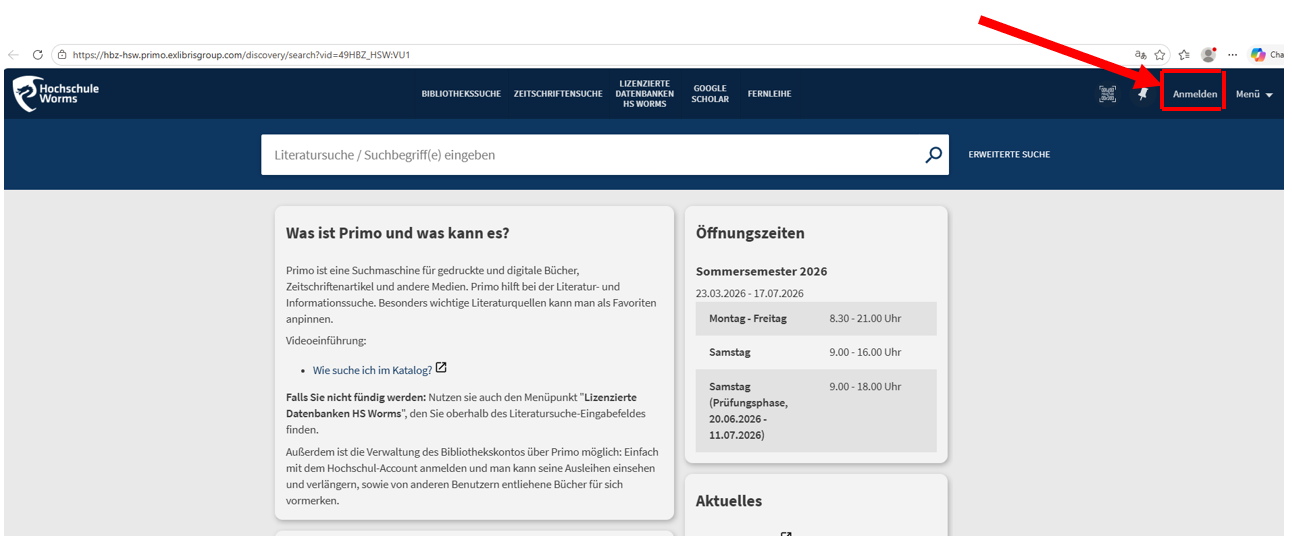
1) You can change your PIN in your user account. You can access your user account from the login screen of the Primo library catalog.
2) Then follow the individual steps in the instructions for changing your PIN.